
The Ready Room engineering team has been as busy as Santa’s elves. For our December release, we bring you a number of very powerful features.
Selectively Release Attachments to Inspectors
Imagine the following scenario: An inspector asks for a specific document. You are aware that as soon as the inspector reviews the requested file, they will ask for two closely related documents. Before today, there were several ways to approach this:
Create the initial request and send it through the workflow, wait for the expected follow up request, create a second request, and send it through the workflow.
Create two requests, one with the asked for document and one with the anticipated documents. Send them both through the workflow, but only release the first. Release the second when asked.
Similar to the above, but create the second task as a staged request.
All of these are perfectly valid, but they have issues. The first adds a significant delay in releasing the follow on documents as the request isn’t started until the inspector asks. (Although it does save work if the inspector never asks.) The second and third have coordination issues. And all of them break up a single logical request into two or more actual requests.
With the December release of Ready Room, there is a better way. First, an admin needs to enable selective release of files to inspectors. Once enabled, when files are uploaded to a request, a new control appears next to each attachment; “Visible to inspector,” which is on by default.
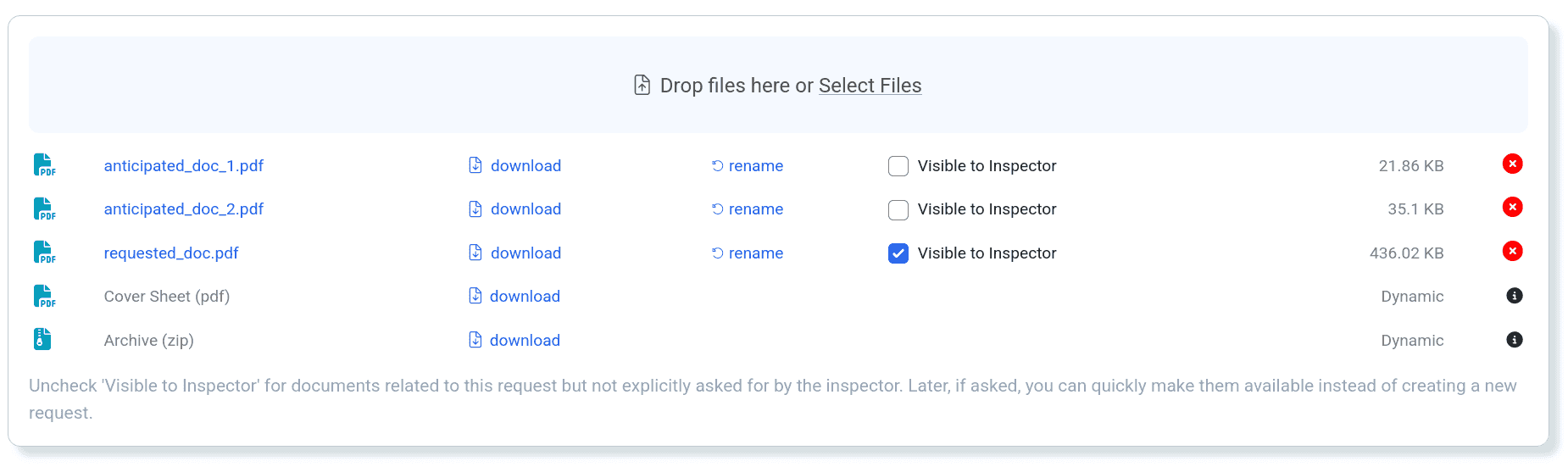
Now, when a team member anticipates a document request based on an actual request, they can upload all of the documents, have them reviewed and QA’d, but select only one to be visible to the inspector. When the inevitable follow up request happens, they can pull the request back, select the remaining attachments, and release it again (see next).
Improve Inspector Access to Returned Requests
Back in August we released an enhancement that, when enabled by an admin, allowed an inspector to continue to interact with requests that had been returned to the inspection team. Based on customer feedback, we have improved this feature by disabling real-time updates for the inspector. That is, the inspector will no longer see changes to returned requests as they are being made, but only when the request is released again.
Complete a Request at Any Time
Another scenario: An inspector makes a request and then, before the request can be released, changes their mind; they don’t need the requested information after all.
Before today, the expectation was that the request would simply be (soft) deleted. But customers felt that “delete” should be reserved for requests created in error. What they wanted was a way to complete a task before releasing it. Now you have it.
At the bottom of every request you will now find a “Mark Request Completed” checkbox. When selected, the request will be rendered as slightly opaque and can no longer be edited or moved. You can add notes, download any attachments, and un-complete the request, but that’s about it. If completed requests begin to clutter up the board, simply filter them out.

Bug Fixes
An error occurred when a user who belonged to multiple accounts updated their profile.
An error occurred when uploading a file to remote storage if the storage provider did not accept the connection.