
It’s been a quiet summer Ready Room release wise. But that doesn’t mean we haven’t been hard at work. We Have. In fact, we’ve been so hard at work that this weekend’s release gets a major version bump. Introducing Ready Room version 12.0.0.
Initialisms, Acronyms, and Numeronyms
I18N + L10N
I18N (a numeronym) is how programmers spell internationalization; the first letter, I, followed by 18 more letters, then the last letter, N. I18N means, as you would expect, the effort of translating a system from one language to another. L10N, localization, similarly, is the effort to support local idioms and formatting. For instance, using a comma instead of a period for decimal points.
This summer, our engineers completely internationalized Ready Room! (We spent a little less time localizing things.) And first out of the gate is support for the Japanese, German, and Italian.
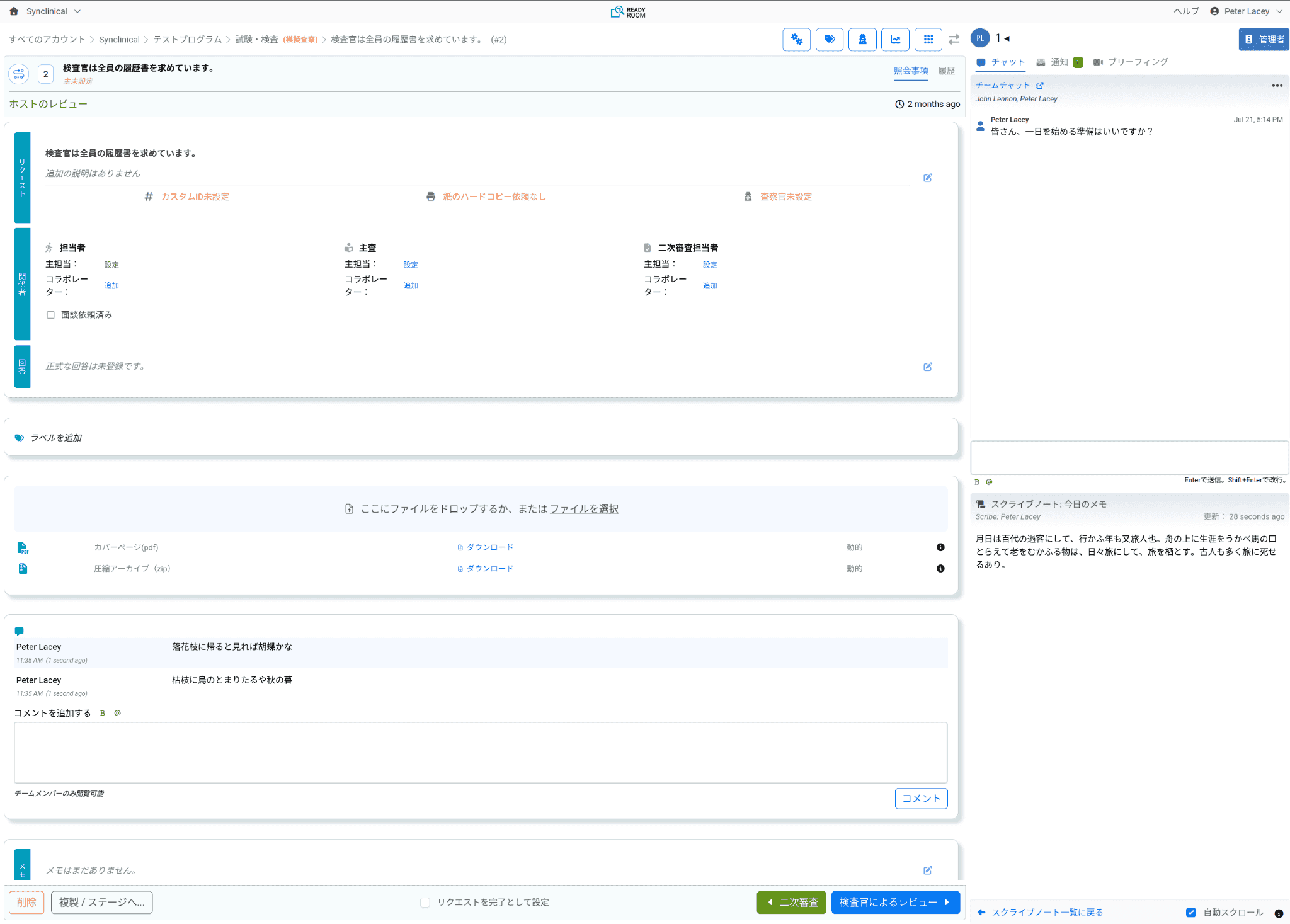
It turns out that no one involved with Ready Room speaks any of these languages. For that, we relied on our partner, Localazy, a (highly recommended) translation service. We welcome feedback from native speakers on anything you see that needs fine-tuning.
Please let us know what languages you would like to see supported next.
Program Config UI
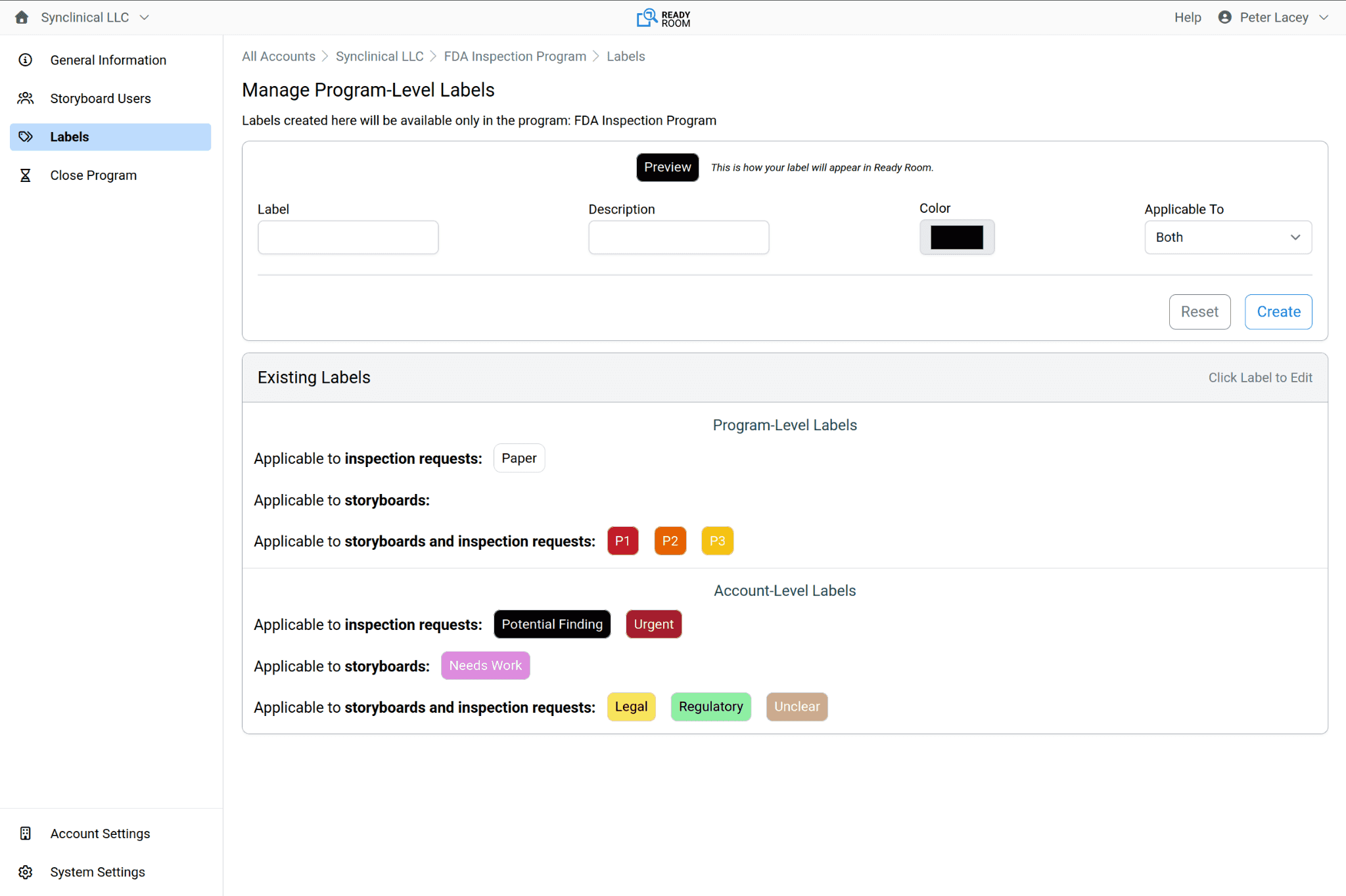
Program-level config (a clipping) is no longer the odd man out. Program-level labels now have their own configuration user interface (UI). You can get there by clicking the gear icon to the far right of the program name when programs are listed, or, as always, by clicking the “tag” icon on the main inspection screen.
Storyboard Members
...it’s now possible to assign members directly to a program! By which we mean storyboards have their own users, independent of any inspections in the program. Prior to this release, storyboard users consisted of the union of all the users in the program’s inspections, meaning you had to create an inspection and add users to it even if you only wanted to assign users to storyboards. Not anymore.
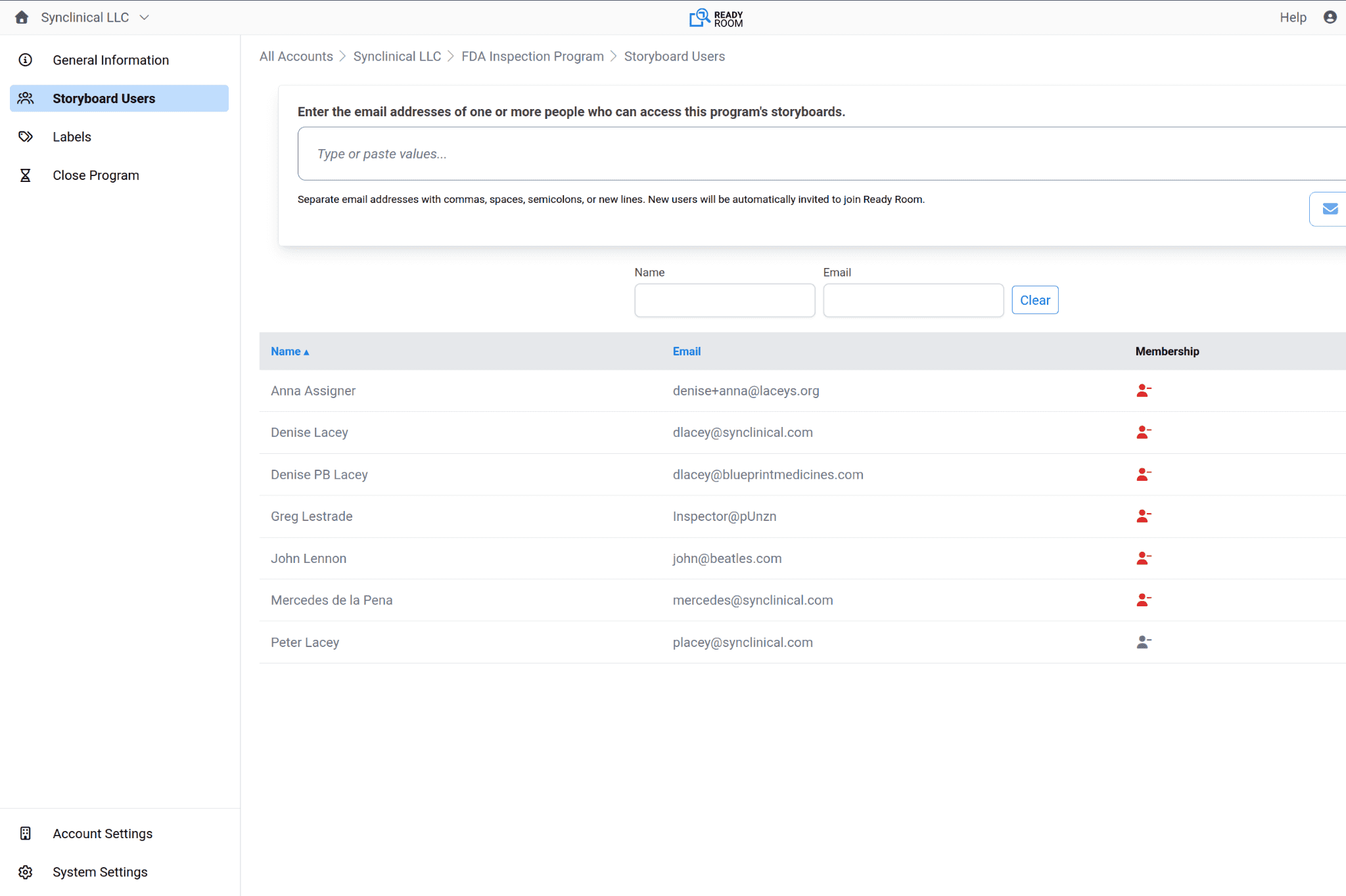
Today, there are no roles or permissions pertaining to storyboards, so all program members have the same privileges, but over the next few months we will continue to bring storyboards up to par with inspections. This will include support for program-level roles, custom columns, real time UI updates, and a proper audited workflow.
Lock and Purge Storyboards
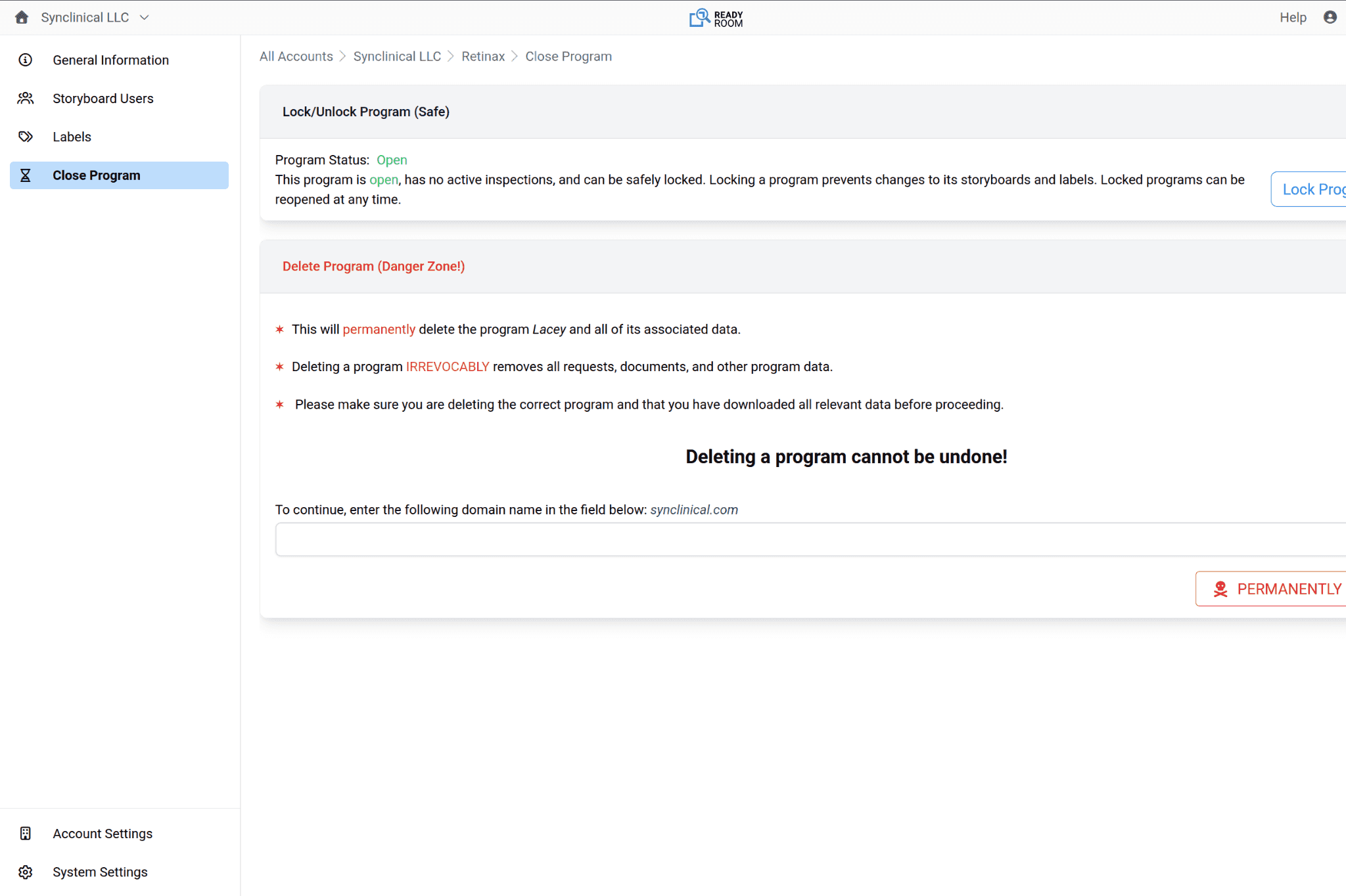
But wait, there’s more. Also with today’s release, it is now possible to “conclude” a program. Like inspections, admins can lock a program, making all of its storyboards uneditable. Or they can “purge” a program, which will irrevocably delete all of its storyboards and their attachments.
SSO AuthN via OIDC
In some circles, technology circles, the title of this section makes perfect sense. If you’re in a different circle, e.g. the GxP (a meta initialism) circle, then not so much. What we’re trying to say here is that with the current release, we have greatly improved single sign-on (SSO, an initialism) authentication (AuthN, a hybrid initialism, not to be confused with AuthZ—authorization) using the OpenID Connect (OIDC) standard. In fact, we completely rewrote it.
From your point of view, there isn’t much of a difference when logging in (though we did move the SSO buttons above the Ready Room-managed login form), but that’s not to say this is a trivial update. All sorts of things improved. I mean, there’s a reason we wrote this.
Provisioning
This is arguably the biggest change. With SSO enabled, your IdP (Okta or Entra ID) is now in full control over who can access Ready Room. If your IdP says that, say, Joe can access Ready Room, then, by golly, Joe can access Ready Room. In other words, it is no longer necessary to invite corporate users to Ready Room and add them to the IdP. Adding them to the IdP is enough. If a user logs in using SSO and they do not currently exist in Ready Room, they will be created dynamically!
You still need to invite external users, of course. You also want to confirm with your IT department that they have created a Ready Room group in your IdP that contains all Ready Room users, and that they have limited access to the Ready Room application to the members of that group.
Multiple SSO Domains
As Ready Room grows, we are attracting larger and larger customers. We now have multiple international customers who are not only asking for native language support but also have multiple business units in multiple countries distinguished by multiple domains, such as example.com, example.co.uk, and example.de. Similarly, we have customers growing by acquisition, who keep the acquired company's domain but still use a single IdP. That is, Example Pharma may have acquired Acme Therapeutics and added the latter’s domain (and users) to their existing IdP.
Previously, Ready Room SSO support was locked to a single domain, but no longer. Now, as mentioned, the IdP is in charge, irrespective of domain. And if Example Pharma’s IdP says Sue from Acme Therapeutics can access Ready Room, then...well, you get the idea.
Improved Security
Finally, we took this opportunity to introduce additional security around SSO logins. We now validate the IdP’s signatures when retrieving access and identity tokens, and we’ve added additional protection against CSRF and replay attacks. Oh, and we removed support for Cisco Duo as an IdP since no one was using it.
Nerdy Stuff
You can’t see these changes, but they do make everything better. I’ll list them so you have a sense of how Ready Room improves over time, but I won’t explain them. Feel free to skip.
- We replaced our Kubernetes-based node clustering with DNS clustering, which is less error prone and should make for smoother deployments.
- Google ended support for its Elixir SDK, so we replaced it with a home-grown REST (REpresentational State Transfer, an acronym) solution.
- That allowed us to remove the HTTP client library that Google depended on, which gave us the impetus needed to remove all but one of the remaining HTTP client libraries. We now use only the community recommended Req library for our HTTP needs, reducing memory footprint and code complexity, while eliminating a bunch of CVEs.
- And that allowed us to clean up how email messages are rendered, removing two more external libraries and their attendant complexity.
- Finally, we upgraded (again, then again) all of our (remaining) external libraries to their latest versions.
A note about CVEs and external libraries
In this brave new AI world we live in, it is the work of a moment for a bad guy to ask an AI to find exploitable flaws in various open-source libraries. And they have. They Are. Continuously. It appears that more CVEs (Common Vulnerability and Exposures) have been opened in the past ten months than in the previous ten years. Fortunately, this spike in CVEs is actually because the good guys can use AI too. And they are. And then they are fixing (and reporting) the vulnerabilities before the bad guys can exploit them. It’s a lot, but it’s worth it.
It’s a lot for us too. It takes a great deal of time to continuously upgrade external libraries to address the flood of CVE and bug fixes in our dependencies, but we do—and it’s worth it. We’ve also gotten really, really good at it. Not only have we removed all non-essential or redundant libraries, we’ve also automated CVE detection, and have a suite of over 3,000 automated tests that run with every change, to protect against regressions.
You may want to ask your other vendors how they are handling this torrent of CVEs. Ready Room prides itself on its security posture and on having, at any one time, no known bugs in production. I doubt there are many others that can make that claim. If you do ask, brace yourselves for what you’ll learn, it likely won’t be pretty.
Bug Fixes
As always (and as implied by the above), all of the following issues were fixed in production when they were discovered. We’re just listing them now.
- Restore the accidentally removed ability to print scribe notes.
- Locking an inspection, removed task labels.
- Non-ascii characters in CSVs were parsed incorrectly by Excel.