
Chōsoku
Three FDA inspectors showed up on Monday. Three! They asked to be seated separately, sending us scrambling to find three free conference rooms, three scribes, and three people to act as hosts. That was two days ago, and the requests have been non-stop ever since. Right now, there’s a total of 107 requests, 37 of them still to be released.
I am the ready room (lower case) team lead. I’ve got 25 people back here with me and who knows how many SMEs spread across 12 time zones. In front of me, laptops are strewn across the conference table over which innumerable cables snake around half-filled cups of cold coffee. On the credenza along the far wall sit three empty boxes of Dunkin’ Donuts and two (thankfully) idle laser printers. I'm wishing there were windows.
Despite what you might think, the team is strangely calm. Unlike last year, no one is swearing or crying or regretting their decision to quit smoking. Ready Room (upper case) is a large part of that, of course, helping to get them prepared and providing real-time visibility into the inspection for stakeholders across two continents. QA and clin-ops, regulatory and safety, even senior management and our CRO can collaborate via a single intuitive interface to keep the inspection humming along.
We’ve got a front room team capturing requests, taking scribe notes, and interfacing with the (three!) inspectors. While members of my team are assigning requests, reviewing responses, and collaborating over chat, video, and comment streams. And there are SMEs all over the world, answering questions and uploading documents.
That works for them. But for me, the team lead, I need to focus. I’ve got 37—38!—outstanding requests, 13 inches of screen real estate, and 3 more hours before this day ends. In Ready Room, I click the icon of a person meditating to activate Zen mode.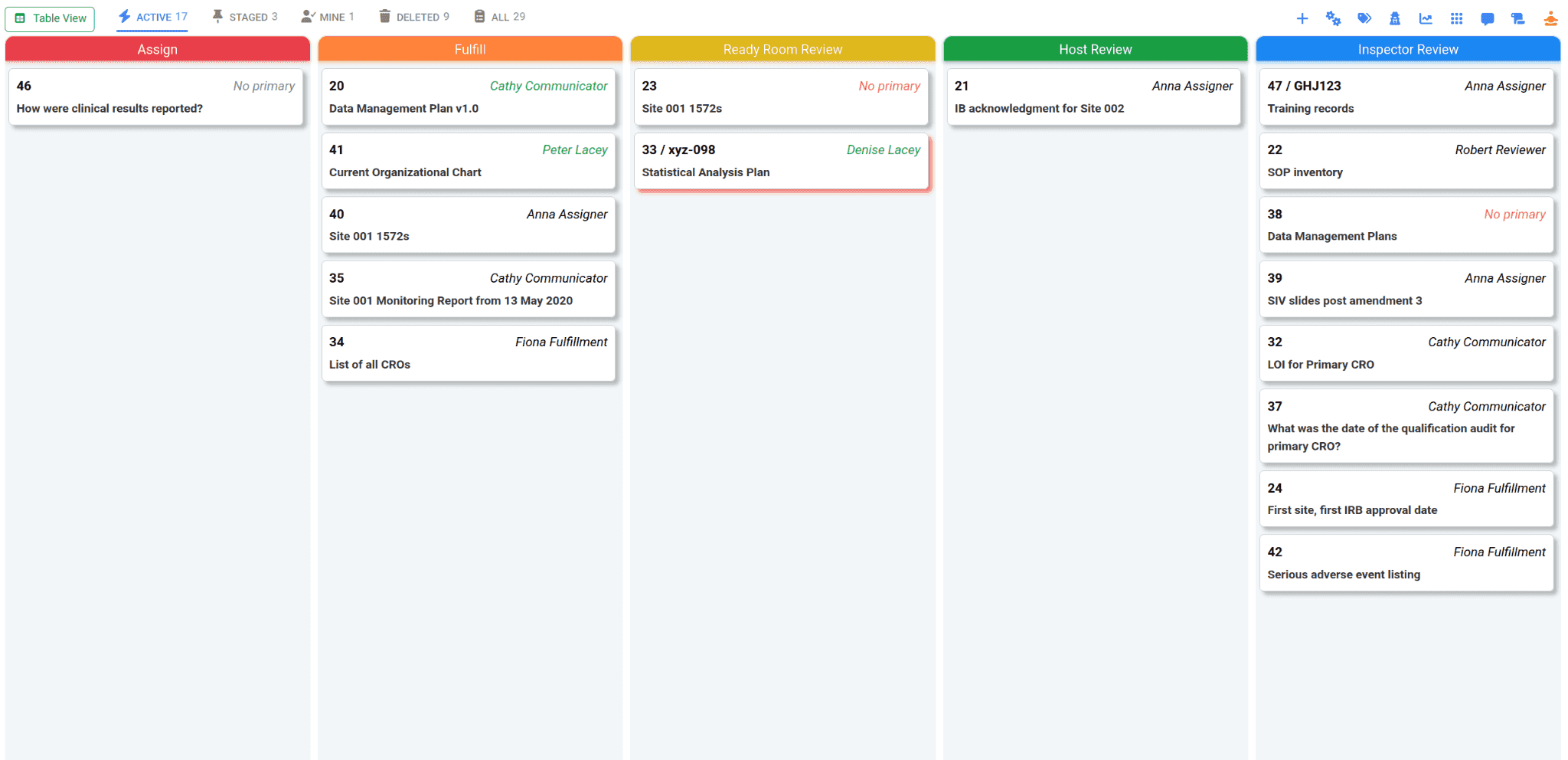
Now I can focus on just the requests in flight without any distractions. I still get notifications, of course, but they are pleasingly ephemeral. Whereas in normal mode I could see maybe 20 requests at a time, in Zen mode I can see three times as many. Drag & drop works, the various boards remain accessible, and I can even switch to the table view if I need to.
Not every team lead needs to be quite so austere. It’s still possible to collapse only the side panel out of the way, leaving the banner and the request cards as they always were. If I had a large monitor, that’s probably what I’d do.
Probably.
Ohmmmmm.
It’s a Little Too Easy to Click “Close”
When editing a request, users click open the appropriate section, make their changes, and click Close. No wait! Save! Damnit.
With the latest release, we take more steps to help mitigate against accidental data loss. Now, when editing any request field that requires saving, we first color the section title on the left amber to remind users that there are unsaved changes. Next, if you open a second section, we no longer silently throw away unsaved changes to the current section. Finally, if the user clicks “Close” or tries to promote/demote the request when there are unsaved changes, they are asked to confirm that they really want to do that.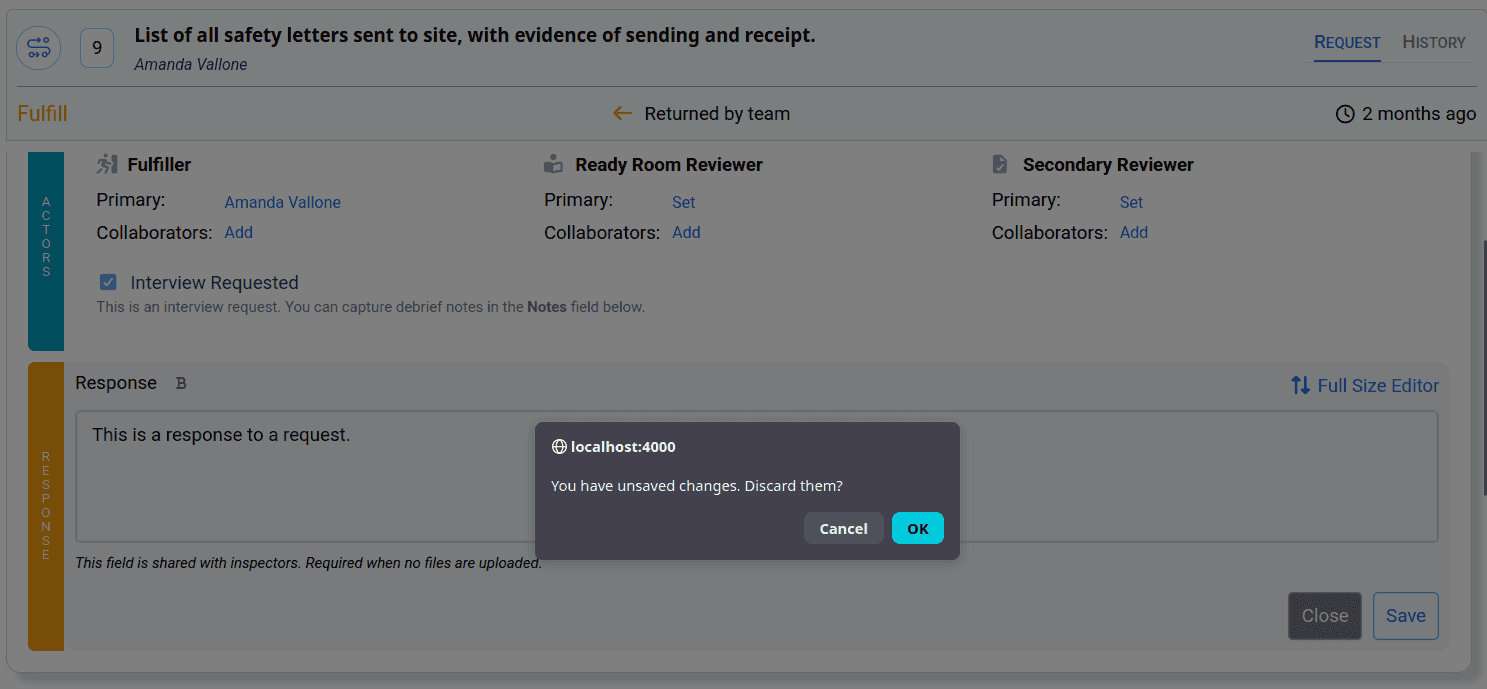
Minor UI Tweaks
- The navigation bar has been streamlined; it’s now narrower and gray. More importantly, the link to the account configuration screens is now under the Profile menu.
- Tabs have been made to look, we hope, more modern.
- The “collapse side panel” icon has been changed and moved next to the new Zen Mode icon.
- Column headers are now centered.
- And more stuff like that.
Bug Fixes
Several of the following issues have been fixed and deployed between our previous release and this one.
- File names containing two contiguous dots (e.g. whatever..pdf) were not accessible after uploading.
- Azure SSO was incorrectly prioritizing the userPrincipalName over the mail field.
- Workaround a Chrome bug that adds whitespace to the bottom of the viewport when scrollable content exceeds the viewport size.
- Properly initialize the inspector portal when viewed by an inspection team member.
- Restore labels to password fields.